
is an Emacs app for exporting syntax-highlighted buffers to html files. This post is about how to install it.
1. In the Bash terminal, get htmlize by the following command:
sudo apt-get install elpa-htmlize
2.0 Change the value of the variable htmlize-output-type to inline-css by the following steps:
2.1 In Emacs, run the function describe-variable by the hotkey:
Ctrl-h v
2.2 When you are asked to describe variable, type
htmlize-output-type
2.3 Click “customize“.
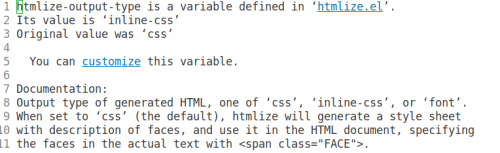
2.4 Click “Value Menu“.

2.5 Select “inline-css“.
2.6 Click “Apply and Save“.

.
3.1 Then whenever you want to turn the Emacs buffer into html, run the command
M-x htmlize-buffer
The buffer will show the generated html code.
3.2 Save the buffer as an html file. The html code itself will get syntax-highlighted.
.
4.1 In the output html file, delete everything before
<body style="color: #333333; background-color: #FFFFFF;">
4.2 Then replace these 2 lines
<body style="color: #333333; background-color: #FFFFFF;">
    <pre>
with
<pre style="color: #333333;background-color: #FFFFFF">
4.3 Delete everything after
</pre>
— Me@2023-01-15 03:39:29 PM
.
.
2023.01.22 Sunday (c) All rights reserved by ACHK
 Physics Town
You must be logged in to post a comment.