4 Basis Fields, 2.2

Functional Differential Geometry

.

Why does d/dx appear in the book’s code (e.g. when defining a vector field like e0) before it is ever explicitly defined with a define, and why is it unbound until you run certain coordinate-system definitions?

In the FDG library (scmutils), the symbols d/dx, d/dy, d/dr, d/dθ, etc. are automatically created as literal vector-field basis objects the first time you define coordinates on a manifold using define-coordinates.

Specifically:

; rectangular coordinates
(define-coordinates (up x y) R2-rect)

does two things behind the scenes:

  1. It creates coordinate functions x, y (or r, theta) that go from points → numbers.
  2. It simultaneously creates the dual basis vector fields named d/dx, d/dy (or d/dr, d/dθ) that are literal vector fields on that coordinate system.
(for-each (lambda (name)
            (environment-define env
                                (string->symbol (string-append "d/d" (symbol->string name)))
                                (make-literal-vector-field name coord-sys)))
          coordinate-names)

These d/d… objects are not defined by a visible define in the user code; they are inserted into the global environment by the macro define-coordinates itself.

— Me@2025-10-12 10:49:20 AM

.

.

2025.12.07 Sunday (c) All rights reserved by ACHK

Posted in FDG

4 Basis Fields, 2

Functional Differential Geometry

.

(define e0
  (+ (* (literal-manifold-function 'e0x R2-rect)
        d/dx)
     (* (literal-manifold-function 'e0y R2-rect)
        d/dy)))

This code is misleading because:

1. The term d/dx is undefined:

1 ]=> (pp d/dx)

;Unbound variable: d/dx

2. It is defined only implicitly, making it difficult to follow:

(define-coordinates (up x y) R2-rect)

(define-coordinates (up r theta) R2-polar)

(define R2-rect-chi-inverse
  (point R2-rect))

(define R2-rect-point
  (R2-rect-chi-inverse (up 'x_0 'y_0)))

Once implicitly defined, we can print its definition:


1 ]=> (pp d/dx)
(lambda (f)
  (compose ((apply partial i) (compose f (coordinate-system '->point)))
           (coordinate-system '->coords)))

;No return value.

1 ]=> 

However, we still do not know where d/dx is defined.

— Me@2025-03-19 02:35:03 PM

.

.

2025.03.20 Thursday (c) All rights reserved by ACHK

Posted in FDG

4 Basis Fields, 1

Functional Differential Geometry

.

3.1

… ; they measure how quickly the coordinate functions change in the direction of the vector field, scaled by the magnitude of the vector field: …

\begin{aligned}  b^i_{\chi, \mathbf{v}} &= \mathbf{v}(\chi^i) \circ \chi^{-1}   \end{aligned}

The first factor \mathbf{v}(\chi^i) is just the meaning of the definition of b^i_{\chi, \mathbf{v}}. The second factor is needed because the input of b^i_{\chi, \mathbf{v}} is x, not \mathbf{m}.

\begin{aligned}  b^i_{\chi, \mathbf{v}} (x)   &= \mathbf{v}(\chi^i) (\mathbf{m}) \\  &= \mathbf{v}(\chi^i) ( \chi^{-1} (\chi (\mathbf{m}))) \\  &= \mathbf{v}(\chi^i) \circ \chi^{-1} (x)   \end{aligned}

In other words, \mathbf{v}(\chi^i) (\mathbf{m}) is just the definition of b^i_{\chi, \mathbf{v}} (x).

.

3.2 p. 21

\displaystyle{ \textbf{v}(\text{f})(\textbf{m})} is the direction derivative of the function \displaystyle{\text{f}} at the point \displaystyle{ \textbf{m} }.

.

3.3 p. 22 Eq. (3.4):

\displaystyle{ \begin{aligned}  \textbf{v}(\text{f})(\textbf{m})  &= (D( \textbf{f} \circ \chi^{-1}) b_{\chi,\mathbf{v}}) \circ \chi)(\textbf{m}) \\  \end{aligned} }

.

4.1 p. 41 Eq. (4.1):

\displaystyle{ \textbf{v}(\text{f})(\textbf{m})    = \textbf{e}(\textbf{f})(\textbf{m})\textbf{b}(\textbf{m}) = \sum_{i} \textbf{e}_i (\textbf{f})(\textbf{m}) \textbf{b}^i(\textbf{m})}

In other words, \textbf{b}^i‘s and \textbf{e}_i‘s represent the amount and direction of changes respectively.

.

4.2 p. 33

A one-form field is a generalization of this idea; it is something that measures a vector field at each point.

One-form fields are linear functions of vector fields that produce real-valued functions on the manifold.

— Me@2025-01-17 03:59:54 PM

.

.

2025.01.19 Sunday (c) All rights reserved by ACHK

Posted in FDG

Ex 3.3: Hill Climbing, 2

Functional Differential Geometry

.

b. Write this as a computational expression.

~~~

\begin{aligned}   P &= mg \frac{d h}{d t} \\   &= mg \left( \frac{\partial h}{\partial x} \frac{dx}{dt} + \frac{\partial h}{\partial y} \frac{dy}{dt} \right) \\   &= mg \begin{bmatrix}   \frac{\partial h}{\partial x} & \frac{\partial h}{\partial y} \end{bmatrix} \begin{bmatrix} \frac{dx}{dt} \\ \frac{dy}{dt} \end{bmatrix} \\  &= mg (\nabla h) \cdot \mathbf{v} \\  &= mg (D f(\chi(\mathbf{m})) b(\chi{(\mathbf{m}})) \\   \end{aligned}

(define (components->vector-field components coordsys)
  (define (v f)
    (compose (* (D (compose f (point coordsys)))
                components)
             (chart coordsys)))
  (procedure->vector-field v))

(define R2->R (-> (UP Real Real) Real))

(define v
  (components->vector-field
   (up (literal-function 'v_x R2->R)
       (literal-function 'v_y R2->R))
   R2-rect))

(define R2-rect-chi-inverse
  (point R2-rect))

(define R2-rect-point
  (R2-rect-chi-inverse (up 'x_0 'y_0)))

(show-expression
 ((v (literal-manifold-function
      'h R2-rect)) R2-rect-point))

\left(      \left(v_x \left(\begin{pmatrix} x_0 \\ y_0 \end{pmatrix}\right) \cdot \left(\partial_0 h \right)\right|_{\begin{pmatrix} x_0 \\ y_0 \end{pmatrix}} +      \left(v_y \left(\begin{pmatrix} x_0 \\ y_0 \end{pmatrix}\right) \cdot \left(\partial_1 h \right) \right|_{\begin{pmatrix} x_0 \\ y_0 \end{pmatrix}}  \right)

— Me@2024-11-22 04:05:26 PM

.

.

2024.12.15 Sunday (c) All rights reserved by ACHK

Posted in FDG

Ex 3.3: Hill Climbing, a

Functional Differential Geometry

.

The topography of a region on the Earth can be specified by a manifold function h that gives the altitude at each point on the manifold. Let v be a vector field on the manifold, perhaps specifying a direction and rate of walking at every point on the manifold.

a. Form an expression that gives the power that must be expended to
follow the vector field at each point.

b. …

~~~

Let f be a real-valued function, \mathbf{m} be a point, \mathbf{v} be a vector field on the manifold function respectively:

\begin{aligned}   h \left( \begin{bmatrix} x \\ y \end{bmatrix} \right) &= f\left(\chi (\mathbf{m}) \right) \\  \mathbf{v} &= \frac{d}{dt} \begin{bmatrix} x \\ y \end{bmatrix}  \\   \end{aligned}

.

\begin{aligned}   P &= mg \frac{d h}{d t} \\   &= mg \left( \frac{\partial h}{\partial x} \frac{dx}{dt} + \frac{\partial h}{\partial y} \frac{dy}{dt} \right) \\   &= mg \begin{bmatrix}   \frac{\partial h}{\partial x} & \frac{\partial h}{\partial y} \end{bmatrix} \begin{bmatrix} \frac{dx}{dt} \\ \frac{dy}{dt} \end{bmatrix} \\  &= mg (\nabla h) \cdot \mathbf{v} \\  &= mg (D f(\chi(\mathbf{m})) b(\chi{(\mathbf{m}})) \\   \end{aligned}

— Me@2024-11-22 04:05:26 PM

.

.

2024.12.10 Tuesday (c) All rights reserved by ACHK

Posted in FDG

scmutils for Ubuntu 24.04

Scheme Mechanics Installation for GNU/Linux | scmutils, 4

.

1. Folks, the scmutils library is fantastic and it’s available in Ubuntu 24.04. You can install it very easily with this command:

sudo apt-get install scmutils

2. Then, you just run it with this command:

mit-scheme --band mechanics.com

.

Now, let me tell you, there’s no syntax highlighting. Not great! And more importantly, there’s no direct way to save your code. So, what do you do? You use the Emacs editor. It’s the best!

Now, this assumes you know Emacs. If you don’t, it’s a tremendous editor.

3. Open Emacs’ initialization file. It’s located right here:

~/.emacs

4. Add this beautiful code to the file:

(defun mechanics ()
  (interactive)
  (run-scheme
   "mit-scheme --band mechanics.com"))
(setq sicm-file "~/Documents/tt.scm")

(fset 'set-working-file
      (lambda (&optional arg) 
        (interactive "p")
        (funcall (lambda ()
                   (insert
                    (concat "(define sicm-file \""
                            sicm-file
                            "\")\n"))))))

(fset 'load-scm
      (lambda (&optional arg) 
        (interactive "p")
        (funcall (lambda ()
                   (insert "(load sicm-file)")))))

(defun mechan ()
  (interactive)
  (split-window-below)
  (windmove-down)
  (mechanics)
  (set-working-file)
  (comint-send-input)
  (windmove-up)
  (find-file sicm-file)
  (end-of-buffer)
  (windmove-down)
  (cond ((file-exists-p sicm-file)
         (interactive)
         (load-scm)
         (comint-send-input)))
  (windmove-up))

(defun sicm-exec-line ()
  (interactive)
  (save-buffer)
  (windmove-down)
  (comint-send-input)
  (windmove-up))

(defun sicm-exec-file ()
  (interactive)
  (save-buffer)
  (windmove-down)
  (load-scm)
  (comint-send-input)
  (windmove-up))

(global-set-key (kbd "C-x C-e") 'sicm-exec-line)

(global-set-key (kbd "C-x C-a") 'sicm-exec-file)

5. Close Emacs and then re-open it, folks.

6. Type the command

M-x mechan

Now, listen, when I say M-x, I mean you press the Alt key and x together. Then, just type mechan. It’s easy, believe me!

7. You’ll see the Emacs editor split into two windows, one on top and one on the bottom.

The lower window is the Scheme environment. You can type a line of code and then press Enter to execute it. So simple!

The upper window is the editor. Type multiple lines of code and then hit

C-x C-e

to execute it.

That means pressing Ctrl and x together, then Ctrl and e together. Easy stuff!

8. When you save the current file, your Scheme code will be saved to this location:

~/Documents/tt.scm

If you need to back up your code, just back up this file. It’s that simple, folks!

— Me@2020-03-10 10:59:45 PM

.

.

2024.12.01 Sunday (c) All rights reserved by ACHK

Ex 3.2 Verification, 2.1

Functional Differential Geometry

.

Verify that the coefficients of a one-form field transform as described in equation (3.56). You should use equation (3.44) in your derivation.

~~~

Eq. (3.56):

a(\chi(\mathbf{m})) = a'(\chi'(\mathbf{m})) \left[D(\chi \circ (\chi')^{-1})(\chi'(\mathbf{m}))\right]^{-1}

.

The general one-form \boldsymbol{\omega} is a linear combination of coordinate-basis one-form fields:

Eq. (3.15):

\begin{aligned}   \text{X}_i(\text{f})(\mathbf{m})   &= D(\text{f} \circ \chi^{-1})(\chi(\mathbf{m})) u_i(\chi(\mathbf{m})) \\  &= \partial_i(\text{f} \circ \chi^{-1})(\chi(\mathbf{m}))   \end{aligned}

.

Given a vector field \mathbf{v}, we define the coordinate-basis one-form fields as

Eq. (3.40):

\tilde{\text{X}} (\mathbf{v}) (\mathbf{m}) = \mathbf{v}(\chi)(\mathbf{m})

So

\begin{aligned}   \tilde{\text{X}}^i (\text{X}_j) (\mathbf{m})   &= \text{X}_j (\chi^i)(\mathbf{m}) \\  &= \text{X}_j (\chi^i \circ \chi^{-1})(\chi (\mathbf{m})) \\  &= \partial_j (\chi^i \circ \chi^{-1})(\chi (\mathbf{m}))   \end{aligned}

Consider also that

\displaystyle{ \begin{aligned}      x^i &= \chi^i (\mathbf{m}) \\        &= \chi^i (\chi^{-1} (\chi (\mathbf{m}))) \\        &= (\chi^i \circ \chi^{-1}) (x) \\    \end{aligned}}

Then, we have Eq. (3.41):

\begin{aligned}   \tilde{\text{X}}^i (\text{X}_j) (\mathbf{m})   &= \delta^i_{~j} \   \end{aligned}

.

Eq. (3.42):

\begin{aligned}  \boldsymbol{\omega}(\mathbf{v})(\mathbf{m})   &= a(\chi(\mathbf{m})) \tilde{\text{X}}(\mathbf{v})(\mathbf{m}) \\  &= \sum_{i} a_i(\chi(\mathbf{m})) \tilde{\text{X}}^i(\mathbf{v})(\mathbf{m}) \\  \boldsymbol{\omega}(\mathbf{v})  &= (a \circ \chi) \tilde{\text{X}} (\mathbf{v}) \\  \end{aligned}

Therefore,

\begin{aligned}  \boldsymbol{\omega}(\text{X}_i)(\mathbf{m})   &= \sum_{j} a_j(\chi(\mathbf{m})) \tilde{\text{X}}^j(\text{X}_i)(\mathbf{m}) \\    &= a_i(\chi(\mathbf{m})) \\  \boldsymbol{\omega}(\text{X}_i)(\chi^{-1}(x))   &= a_i(x) \\  \end{aligned}

Eq. (3.44):

\begin{aligned}  a_i(x) &= \boldsymbol{\omega}(\text{X}_i)(\chi^{-1}(x)) \\  &= (a' \circ \chi') \tilde{\text{X}'}(\text{X}_i) (\chi^{-1}(x)) \\  \end{aligned}

— Me@2024-09-18 06:38:02 AM

.

.

2024.10.25 Friday (c) All rights reserved by ACHK

Posted in FDG

Ex 3.2 Verification, 1

Functional Differential Geometry

.

A one-form is a concept from differential geometry and tensor analysis. It is defined as an order 1 covariant tensor field. Here are the key points about one-forms:

1. Definition: A one-form is a mathematical object that can be thought of as a linear functional that takes a vector as input and produces a scalar. In simpler terms, it is a way to assign a number to each vector in a vector space.

2. Mathematical Representation: One-forms can be represented in local coordinates as:

\omega = f_1 \, dx^1 + f_2 \, dx^2 + \ldots + f_n \, dx^n

where f_i are smooth functions and dx^i are the differentials of the coordinates.

3. Applications: One-forms are used in various fields, including physics, particularly in the context of differential forms, which are essential in the formulation of concepts like integration on manifolds and in the study of electromagnetic fields.

4. Geometric Interpretation: Geometrically, one-forms can be visualized as fields that assign a scalar value to each tangent vector at a point on a manifold, allowing for the measurement of various properties like lengths and angles.

Conclusion

In summary, a one-form is a fundamental concept in differential geometry, serving as a linear functional that maps vectors to scalars, and plays a crucial role in various mathematical and physical applications.

— AI

.

.

2024.09.18 Wednesday (c) All rights reserved by ACHK

Posted in FDG

3 Vector Fields and One-Form Fields, 3.2

Functional Differential Geometry

.

3.2.1

Instead, the ordinary directional derivative is

\displaystyle{(Df(x)) \Delta x}

or

\displaystyle{\begin{aligned} D_{\mathbf{v}}(f) &= \frac{\left(\delta f\right)_{\mathbf{v}}}{|\mathbf{v}|} &= \left(\nabla f\right) \cdot \hat{\mathbf{v}} \\ \end{aligned}}

3.2.2

The first generalization of directional derivative is replacing \displaystyle{\Delta x}, a vector independent of \displaystyle{x}, with \displaystyle{b(x)}, a vector function of \displaystyle{x}.

1. Note that

\displaystyle{(Df(x)) \Delta x \ne D_{\mathbf{v}}(f)}

Instead,

\displaystyle{\begin{aligned}  (Df(x)) \Delta x &\approx \Delta f \\  (Df(x)) &= D_{\mathbf{v}}(f) \\  \end{aligned}}

2. The physical meaning of \displaystyle{b(x)} is given by:

p. 25

The function b is the coefficient function for the vector field v. It provides a scale factor for the component in each coordinate direction.

3.

(define (components->vector-field components coordsys)
  (define (v f)
    (compose (* (D (compose f (point coordsys)))
                components)
             (chart coordsys)))
  (procedure->vector-field v))

(define R2->R (-> (UP Real Real) Real))

(define R2-rect-chi-inverse
  (point R2-rect))

(define R2-rect-point
  (R2-rect-chi-inverse (up 'x_0 'y_0)))

(define v
  (components->vector-field
   (up (literal-function 'b^0 R2->R)
       (literal-function 'b^1 R2->R))
   R2-rect))

((v (literal-manifold-function 'f_rect R2-rect))
 R2-rect-point)

(define v
  (literal-vector-field 'b R2-rect))

((v (literal-manifold-function 'f_rect R2-rect))
 R2-rect-point)

4. Eq. (3.7):

\displaystyle{\text{v}(\chi)(\chi^{-1}(x)) = b_{\chi, \text{v}} (x)}

p. 25

The vector field \displaystyle{ \textbf{v} } has a coordinate representation \displaystyle{ v}:

\displaystyle{ \begin{aligned} \textbf{v}(\text{f})(\textbf{m}) &= D( \textbf{f} \circ \chi^{-1})(\chi(\mathbf{m})) b(\chi(\mathbf{m})) \\ &= Df(x) b(x) \\ &= v(f)(x), \end{aligned} }

with the definitions \displaystyle{ f = \mathbf{f} \circ \chi^{-1} } and \displaystyle{ x = \chi (\mathbf{m}) }.

(define (coordinatize v coordsys)
  (define ((coordinatized-v f) x)
    (let ((b (compose (v (chart coordsys))
                      (point coordsys))))
      (* ((D f) x) (b x))))
  (make-operator coordinatized-v))

(((coordinatize v R2-rect) (literal-function 'f_rect R2->R)) (up 'x_0 'y_0))

— Me@2024-09-02 01:06:17 AM

.

.

2024.09.03 Tuesday (c) All rights reserved by ACHK

Posted in FDG

3 Vector Fields and One-Form Fields, 3.1

Functional Differential Geometry

.

p. 22

Eq. (3.4):

\displaystyle{ \begin{aligned}  \textbf{v}(\text{f})(\textbf{m})  &= (D( \textbf{f} \circ \chi^{-1}) b_{\chi,\mathbf{v}}) \circ \chi) \\  \end{aligned} }

(define (components->vector-field components coordsys)
  (define (v f)
    (compose (* (D (compose f (point coordsys)))
        components)
         (chart coordsys)))
  (procedure->vector-field v))

An example:

(define R2->R (-> (UP Real Real) Real))

(define v
  (components->vector-field
   (up (literal-function 'b^0 R2->R)
       (literal-function 'b^1 R2->R))
   R2-rect))

(define R2-rect-chi-inverse
  (point R2-rect))

(define R2-rect-point
  (R2-rect-chi-inverse (up 'x_0 'y_0)))

((v (literal-manifold-function 'f-rect R2-rect))
 R2-rect-point)

(show-expression
 ((v (literal-manifold-function 'f-rect R2-rect))
  R2-rect-point))

(define v
  (literal-vector-field 'b R2-rect))

(show-expression
 ((v (literal-manifold-function 'f-rect R2-rect))
  R2-rect-point))

— Me@2024-08-10 07:06:38 AM

.

.

2024.08.10 Saturday (c) All rights reserved by ACHK

Posted in FDG

3 Vector Fields and One-Form Fields, 2.3

Functional Differential Geometry

.

p. 21

3.2

\displaystyle{ \textbf{v}(\text{f})(\textbf{m})} is the direction derivative of the function \displaystyle{\text{f}} at the point \displaystyle{ \textbf{m} }.

Note that it is not the ordinary directional derivative.

3.2.1

Instead, the ordinary directional derivative is

\displaystyle{(Df(x)) \Delta x}

or

\displaystyle{\begin{aligned}  D_{\mathbf{v}}(f)    &= \frac{\left(\delta f\right)_{\mathbf{v}}}{|\mathbf{v}|} &= \left(\nabla f\right) \cdot \hat{\mathbf{v}} \\  \end{aligned}}

3.2.2

The first generalization of directional derivative is replacing \displaystyle{\Delta x}, a vector independent of \displaystyle{x}, with \displaystyle{b(x)}, a vector function of \displaystyle{x}.

3.2.3

The second generalization of directional derivative is replacing \displaystyle{D} or \displaystyle{\nabla} with \displaystyle{\textbf{v}}, which is a vector function chosen by you.

In differential geometry, a vector is an operator that takes directional derivatives of manifold functions at its anchor point.

The directional derivative of a scalar function f with respect to a vector \displaystyle{\mathbf{v}} at a point (e.g., position) \displaystyle{\mathbf{x}} may be denoted by any of the following:

\displaystyle{\begin{aligned}  \nabla _{\mathbf {v} }{f}(\mathbf {x} )   &=f'_{\mathbf {v} }(\mathbf {x} )=D_{\mathbf {v} }f(\mathbf {x} )=Df(\mathbf {x} )(\mathbf {v} ) \\  &=\partial _{\mathbf {v} }f(\mathbf {x} )=\mathbf {v} \cdot {\nabla f(\mathbf {x} )}=\mathbf {v} \cdot {\frac {\partial f(\mathbf {x} )}{\partial \mathbf {x} }}.\end{aligned}}

Let \displaystyle{\textit{M}} be a differentiable manifold and \displaystyle{\mathbf{p}} a point of \displaystyle{\textit{M}}.

Suppose that \displaystyle{f} is a function defined in a neighborhood of \displaystyle{\mathbf{p}}, and differentiable at \displaystyle{\mathbf{p}}.

If \displaystyle{\mathbf{v}} is a tangent vector to \displaystyle{\textit{M}} at \displaystyle{\mathbf{p}}, then the directional derivative of \displaystyle{f} along \displaystyle{\mathbf{v}}, denoted variously as \displaystyle{df(\mathbf{v})} (see Exterior derivative), \displaystyle{\nabla_{\mathbf {v} }f(\mathbf {p} )} (see Covariant derivative), \displaystyle{L_{\mathbf {v} }f(\mathbf {p} )} (see Lie derivative), or \displaystyle{ {\mathbf {v} }_{\mathbf {p} }(f)} (see Tangent space § Definition via derivations), can be defined as follows.

Let \displaystyle{\gamma: [-1, 1] \to M} be a differentiable curve with \displaystyle{\gamma(0) = \mathbf{p}} and \displaystyle{\gamma'(0) = \mathbf{v}}. Then the directional derivative is defined by

\displaystyle{\nabla _{\mathbf {v} }f(\mathbf {p} )=\left.{\frac {d}{d\tau }}f\circ \gamma (\tau )\right|_{\tau =0}.}

This definition can be proven independent of the choice of \displaystyle{\gamma}, provided \displaystyle{\gamma} is selected in the prescribed manner so that \displaystyle{\gamma(0) = \mathbf{p}} and \displaystyle{\gamma'(0) = \mathbf{v}}.

— Wikipedia on Directional derivative

Tangent vectors as directional derivatives

Another way to think about tangent vectors is as directional derivatives. Given a vector \displaystyle{v} in \displaystyle{ \mathbb {R} ^{n}}, one defines the corresponding directional derivative at a point \displaystyle{ x\in \mathbb {R} ^{n}} by

\displaystyle{ \forall f\in {C^{\infty }}(\mathbb {R} ^{n}):\qquad (D_{v}f)(x):=\left.{\frac {\mathrm {d} }{\mathrm {d} {t}}}[f(x+tv)]\right|_{t=0}=\sum _{i=1}^{n}v^{i}{\frac {\partial f}{\partial x^{i}}}(x).}

This map is naturally a derivation at \displaystyle{ x }. Furthermore, every derivation at a point in {\displaystyle \mathbb {R} ^{n}} is of this form. Hence, there is a one-to-one correspondence between vectors (thought of as tangent vectors at a point) and derivations at a point.

— Wikipedia on Tangent space

4. In a more user-friendly language:

\displaystyle{  \begin{aligned}    \textbf{v}(\textbf{f})(\textbf{m})   &= D_b(f)(x) \\  \end{aligned}  }

\displaystyle{  \begin{aligned}      b^i_{\chi, \mathbf{v}} (x)   &= \mathbf{v}(\chi^i) \circ \chi^{-1} (x) \\   &= \mathbf{v}(\chi^i) (\mathbf{m}) \\   &=  D_b(\chi^i \circ \chi^{-1})(x)  \\   &= \left(\nabla (\chi^i \circ \chi^{-1}) \right)\bigg|_x \cdot \vec b\bigg|_x \\    &= \sum_j \frac{\partial}{\partial x^j}(\chi^i \circ \chi^{-1}) \bigg|_x b^j \bigg|_x \\    \end{aligned}  }

where \displaystyle{ x = \chi (\mathbf{m}) } and

\displaystyle{ \begin{aligned}    x^i &= \chi^i (\mathbf{m}) \\      &= \chi^i (\chi^{-1} (\chi (\mathbf{m}))) \\      &= (\chi^i \circ \chi^{-1}) (x) \\  \end{aligned}}

\displaystyle{  \begin{aligned}      b^i_{\chi, \mathbf{v}} (x)   &= \sum_j \frac{\partial}{\partial x^j}(\chi^i \circ \chi^{-1}) \bigg|_x b^j \bigg|_x \\    &= \sum_j \frac{\partial x^i}{\partial x^j} \bigg|_x b^j \bigg|_x \\    &= \sum_j \delta^{ij} b^j \bigg|_x \\    &= b^i(x) \\    \end{aligned}  }

This is a self-consistency check.

— Me@2024-02-03 04:45:17 PM

.

.

2024.07.13 Saturday (c) All rights reserved by ACHK

Posted in FDG

3 Vector Fields and One-Form Fields, 2.2

Functional Differential Geometry

.

p. 21

2.4

Let

\displaystyle{  \begin{aligned}    D_b(f)(x) &= ((Df)\bigg|_x b \bigg|_x \\   \end{aligned}  },

where \displaystyle{ b(x) } is a coordinate function.

p. 12

A coordinate function \displaystyle{\chi} maps points in a coordinate patch of a manifold to a coordinate tuple:

\displaystyle{x = \chi(\mathbf{m})},

where \displaystyle{x} may have a convenient tuple structure.

2.5

\displaystyle{  \begin{aligned}    \textbf{v}(\text{f})(\textbf{m}) &\ne D_b(f)(x) \\   \end{aligned}  }

Instead, \displaystyle{ \textbf{v}(\text{f})(\textbf{m})} is a further generalization of \displaystyle{ D_b(f)(x)}.

p. 25

The vector field \displaystyle{ \textbf{v} } has a coordinate representation \displaystyle{ v}:

\displaystyle{ \begin{aligned}  \textbf{v}(\text{f})(\textbf{m})  &= D( \textbf{f} \circ \chi^{-1})(\chi(\mathbf{m})) b(\chi(\mathbf{m})) \\   &= Df(x) b(x) \\   &= v(f)(x),   \end{aligned}  }

with the definitions \displaystyle{ f = \mathbf{f} \circ \chi^{-1} } and \displaystyle{ x = \chi (\mathbf{m}) }.

So, actually,

\displaystyle{  \begin{aligned}    \textbf{v}(\text{f})(\textbf{m})   &= D_b(f)(x) \\  &= ((D(f)) \bigg|_x) b \bigg|_x \\  &= (\nabla f)\bigg|_x \cdot \vec b\bigg|_x \\  \end{aligned}  }

2.6

While \displaystyle{ x } is the tuple of coordinate components of a point, \displaystyle{ \textbf{m} } is the abstract point itself.

.

3.1

… ; they measure how quickly the coordinate functions change in the direction of the vector field, scaled by the magnitude of the vector field: …

\displaystyle{  \begin{aligned}      b^i_{\chi, \mathbf{v}} &= \mathbf{v}(\chi^i) \circ \chi^{-1} \\   \end{aligned}  }

\displaystyle{  \chi     } inputs an abstract point and outputs its coordinates.

The first factor \displaystyle{ \mathbf{v}(\chi^i) } is just the meaning of the definition of \displaystyle{ b^i_{\chi, \mathbf{v}} }. The second factor is needed because the input of \displaystyle{ b^i_{\chi, \mathbf{v}} } is \displaystyle{    x \\  }, not \displaystyle{    \mathbf{m} \\  }.

\displaystyle{  \begin{aligned}      b^i_{\chi, \mathbf{v}} (x)   &= \mathbf{v}(\chi^i) (\mathbf{m}) \\  &= \mathbf{v}(\chi^i) ( \chi^{-1} (\chi (\mathbf{m}))) \\  &= \mathbf{v}(\chi^i) \circ \chi^{-1} (x) \\   \end{aligned}  }

In other words, \displaystyle{ \mathbf{v}(\chi^i) (\mathbf{m}) \\ } is just the definition of \displaystyle{ b^i_{\chi, \mathbf{v}} (x) }.

3.2

\displaystyle{ \textbf{v}(\text{f})(\textbf{m})} is the direction derivative of the function \displaystyle{\text{f}} at the point \displaystyle{ \textbf{m} }.

Note that it is not the ordinary directional derivative.

3.2.1

Instead, the ordinary directional derivative is

\displaystyle{(Df(x)) \Delta x}

or

\displaystyle{\begin{aligned}  D_{\mathbf{v}}(f)    &= \frac{\left(\delta f\right)_{\mathbf{v}}}{|\mathbf{v}|} &= \left(\nabla f\right) \cdot \hat{\mathbf{v}} \\  \end{aligned}}

3.2.2

The generalization of directional derivative is replacing \displaystyle{\Delta x}, a vector independent of \displaystyle{x}, with \displaystyle{b(x)}, a vector function of \displaystyle{x}.

— Me@2024-02-03 04:45:17 PM

.

.

2024.02.08 Thursday (c) All rights reserved by ACHK

Posted in FDG

3 Vector Fields and One-Form Fields, 1.2

p. 21

5.

\displaystyle{(Df(x)) b(x) \ne (Df(x)) \Delta x}

Instead, \displaystyle{(Df(x)) b(x)} is a generalization of \displaystyle{(Df(x)) \Delta x}.

6.

However, how to calculate \displaystyle{(Df(x)) b(x)}?

By this:

\displaystyle{f(x + \Delta x) \approx f(x) +  (Df(x)) \Delta x}

Then:

\displaystyle{(Df(x)) = \lim_{\Delta x \to 0} \frac{f(x + \Delta x) - f(x)}{\Delta x}}

So:

\displaystyle{(Df(x)) b(x) = \left( \lim_{\Delta x \to 0} \frac{f(x + \Delta x) - f(x)}{\Delta x} \right) b(x)}

7.

b is written as subscript to capture the meaning of “with respect to b“. The original directional derivative uses the same convention:

So the spatial rate of change of \displaystyle{f} along the direction of the vector \displaystyle{\mathbf{v}} is

\displaystyle{\begin{aligned}  D_{\mathbf{v}}(f)    &= \frac{\left(\delta f\right)_{\mathbf{v}}}{|\mathbf{v}|} \\    &= \frac{1}{|\mathbf{v}|} \left( \frac{\partial f}{\partial x} \delta x + \frac{\partial f}{\partial x} \delta y \right) \\    &= \frac{\partial f}{\partial x} \frac{\delta x}{\sqrt{(\delta x)^2 + (\delta y)^2}}  + \frac{\partial f}{\partial x} \frac{\delta y}{\sqrt{(\delta x)^2 + (\delta y)^2}} \\    &= \left(\nabla f\right) \cdot \frac{\mathbf{v}}{|\mathbf{v}|} \\  &= \left(\nabla f\right) \cdot \hat{\mathbf{v}} \\  \end{aligned}}

\displaystyle{D_{\mathbf{v}}(f)} is called directional derivative.

— Me@2016-02-06 09:49:22 PM

— Me@2023-12-27 01:37:32 PM

— Functional Differential Geometry

.

.

2023.12.27 Wednesday (c) All rights reserved by ACHK

3 Vector Fields and One-Form Fields, 2

Functional Differential Geometry

.

p. 21

1.1

\displaystyle{(Df(x)) \Delta x} is the directional derivative of \displaystyle{f} at \displaystyle{x} with respect to \displaystyle{\Delta x}, which is a vector in terms of a coordinate component tuple.

1.2

Note that \displaystyle{\Delta x} is not actually coordinates, but a change of coordinates. Instead, \displaystyle{x} is the coordinate tuple.

Moreover, \displaystyle{x} and \displaystyle{\Delta x} are independent of each other.

1.3

Instead of being a function of position \displaystyle{x} only, \displaystyle{(Df(x)) \Delta x} depends also on \displaystyle{\Delta x}. So \displaystyle{(Df(x)) \Delta x} is NOT a vector field.

.

2.1

\displaystyle{(Df(x)) b(x) \ne (Df(x)) \Delta x}

Instead, \displaystyle{(Df(x)) b(x)} is a generalization of \displaystyle{(Df(x)) \Delta x}.

2.2

Note that \displaystyle{b(x)} is a function chosen by you.

2.3

Since \displaystyle{(Df(x)) b(x)} is a function of position \displaystyle{x} only, it is a vector field.

2.4

Let

\displaystyle{  \begin{aligned}    D_b(f)(x) &= ((Df(x)) b(x) \\   \end{aligned}  }

2.5

\displaystyle{  \begin{aligned}    \textbf{v}(\text{f})(\textbf{m}) &\ne D_b(f)(x) \\   \end{aligned}  }

Instead, \displaystyle{ \textbf{v}(\text{f})(\textbf{m})} is a further generalization of \displaystyle{ D_b(f)(x)}.

2.6

While \displaystyle{ x } is the tuple of coordinate components of a point, \displaystyle{ \textbf{m} } is the abstract point itself.

— Me@2023-11-19 11:40:49 AM

.

.

2023.11.21 Tuesday (c) All rights reserved by ACHK

Posted in FDG

3 Vector Fields and One-Form Fields, 1

Chain Rule of Differentiation, 2

Functional Differential Geometry

.

p. 21

1.

In multiple dimensions the derivative of a function is the multiplier for the best linear approximation of the function at each argument point:

\displaystyle{f(x + \Delta x) \approx f(x) +  (Df(x)) \Delta x}

In other words:

\displaystyle{  \begin{aligned}  f(x + \Delta x) &= f(x) + a_1 (\Delta x) + a_2 (\Delta x)^2 + \cdots \\   (Df(x)) &= a_1 \\   \end{aligned}  }

2.

The derivative Df(x) is independent of \Delta x.

3.

… the product \displaystyle{(Df(x))\Delta x} is invariant under change of coordinates …

4.

\displaystyle{(Df(x)) \Delta x} is the directional derivative of \displaystyle{f} at \displaystyle{x} with respect to \displaystyle{\Delta x}.

5.

\displaystyle{(Df(x)) b(x) \ne (Df(x)) \Delta x}

Instead, \displaystyle{(Df(x)) b(x)} is a generalization of \displaystyle{(Df(x)) \Delta x}.

— Me@2023-09-29 11:48:36 PM

.

.

2023.09.30 Saturday (c) All rights reserved by ACHK

Lagrange’s equations Debugged

\displaystyle{\frac{d}{dt} \left( \frac{\partial L(t, q, \dot q)}{\partial \dot q} \Bigg|_{\begin{aligned}   q &= w(t) \\  \dot q &= \frac{d w(t)}{dt} \\   \end{aligned}} \right) - \frac{\partial L}{\partial q}\Bigg|_{\begin{aligned}   q &= w(t) \\  \dot q &= \frac{d w(t)}{dt} \\   \end{aligned}}  = 0}

This equation is complete. It has meaning independent of the context and there is nothing left to the imagination. The earlier equations require the reader to fill in lots of detail that is implicit in the context. They do not have a clear meaning independent of the context.

\displaystyle{\frac{d}{dt} \frac{\partial L}{\partial \dot q} - \frac{\partial L}{\partial q} = 0}

— Functional Differential Geometry

.

.

2023.09.05 Tuesday ACHK

Ex 3.1 State Derivatives

Functional Differential Geometry

.

Newton’s equations:

\displaystyle{  \begin{aligned}  D^2 X(t) &= A_x(X(t), Y(t)) \\  D^2 Y(t) &= A_y(X(t), Y(t))  \end{aligned}  }

Coordinate path \displaystyle{\sigma}:

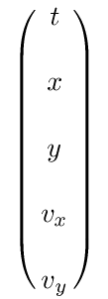
\displaystyle{  \begin{aligned}  \sigma &= \chi \circ \gamma \\  \chi &= (\text{t}, \text{x}, \text{y}, \text{v}_x, \text{v}_y) \\  \end{aligned}  }

What is \chi?

It is a coordinate system on the manifold \mathbf{M}.

What is \gamma?

It is a parametric path.

(p.29) The integral curve of \mathbf{v}

\displaystyle{  \begin{aligned}  \gamma_\mathbf{m}^\mathbf{v}&: \mathbf{R} \to \mathbf{M} \\  \end{aligned}  }

is a parametric path on \mathbf{M} satisfying

\displaystyle{  \begin{aligned}  D(\text{f} \circ \gamma_\mathbf{m}^\mathbf{v})(t)  &= \mathbf{v}(\text{f})(\gamma_\mathbf{m}^\mathbf{v}(t))  = (\mathbf{v}(\text{f}) \circ \gamma_\mathbf{m}^\mathbf{v})(t) \\  \gamma_\mathbf{m}^\mathbf{v}(0) &= \mathbf{m} \\  \end{aligned}  }

What is \mathbf{m}?

(p.22) Let \mathbf{m} be a point on a manifold, \mathbf{v} be a vector on the manifold, and \mathbf{f} be a real-valued function on the manifold.

(define R5 (make-manifold R^n 5))
 
(define U5 (patch 'origin R5))
 
(define R5-rect
  (coordinate-system 'rectangular U5))

(define R5-rect-chi-inverse
  (point R5-rect))

(define R5-rect-point
  (R5-rect-chi-inverse
   (up 't 'x 'y 'v_x 'v_y)))
 
(define-coordinates
  (up t x y v_x v_y) R5-rect)
 
(define v5
  (literal-vector-field 'b R5-rect))
 
(show-expression
 ((v5 (literal-manifold-function
       'f_rect
       R5-rect))
  R5-rect-point))

(show-expression
 ((v5 (chart R5-rect)) R5-rect-point))

(p.29) We can recover the differential equations satisfied by a coordinate representation of the integral curve by letting \mathbf{f}=\chi.

\displaystyle{\begin{aligned}  D(f \circ \gamma_\mathbf{m}^\mathbf{v})(t)  &= \mathbf{v}(f)(\gamma_\mathbf{m}^\mathbf{v}(t))  = (\mathbf{v}(f) \circ \gamma_\mathbf{m}^\mathbf{v})(t) \\  \gamma_\mathbf{m}^\mathbf{v}(0) &= \mathbf{m} \\  \end{aligned}}

(p.29)

\displaystyle{\begin{aligned}  D \sigma(t) &= D(\chi \circ \gamma) (t) \\  &= ... \\  &= (b \circ \sigma)(t), \\  \end{aligned}}

where \displaystyle{  b = \mathbf{v}(\chi) \circ \chi^{-1}} is the coefficient function for the vector field \displaystyle{  \mathbf{v}} for the coordinates \displaystyle{  \chi} (see equation 3.7).

(define R5->R
  (-> (UP Real Real Real Real Real) Real))

(print-expression
 ((literal-function 'f (-> (X Real Real) Real))
  'x 'y))

(define v5
  (components->vector-field
   (up (lambda (b) 1)
       (lambda (b) (ref b 3))
       (lambda (b) (ref b 4))
       (lambda (b)
         ((literal-function 'A_x
                            (-> (UP Real Real) Real))
          (up (ref b 1) (ref b 2))))
       (lambda (b)
         ((literal-function 'A_y
                            (-> (UP Real Real) Real))
          (up (ref b 1) (ref b 2)))))
   R5-rect))

(show-expression
 ((v5 (chart R5-rect)) R5-rect-point))

(series:for-each
 print-expression
 (((exp (* 't v5)) (chart R5-rect))
  ((point R5-rect) (up 't 'x 'y 'v_x 'v_y)))
 3)

(series:for-each
 show-expression
 (((exp (* 't v5)) (chart R5-rect))
  ((point R5-rect) (up 't 'x 'y 'v_x 'v_y)))
 4)

(define ((((evolution order) delta-t v) f) m)
  (series:sum
   (((exp (* delta-t v)) f) m)
   order))

(show-expression
 ((((evolution 1) 'Delta_t v5) (chart R5-rect))
  ((point R5-rect)
   (up 't_0 'x_0 'y_0 'v_x0 'v_y0))))

(show-expression
 ((((evolution 2) 'Delta_t v5) (chart R5-rect))
  ((point R5-rect) 
   (up 't_0 'x_0 'y_0 'v_x0 'v_y0))))

— Me@2023-07-21 08:12:30 PM

.

.

2023.07.23 Sunday (c) All rights reserved by ACHK

Posted in FDG

Ex 2.2 Stereographic Projection

Functional Differential Geometry

.

The points on the plane can also be specified with polar coordinates \displaystyle{(\rho, \theta)} and the points on the sphere are specified both by Riemann coordinates and the traditional colatitude and longitude \displaystyle{(\phi, \lambda)}.

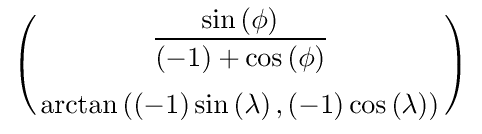
(show-expression
 ((compose
   (chart S2-spherical)
   (point S2-Riemann)
   (chart R2-rect)
   (point R2-polar))
  (up 'rho 'theta)))

~~~

1. The code

 
(up 'rho 'theta)

represents the polar coordinates of a point.

2. The function

 
(point R2-polar)

generates an abstract point from a point in R2-polar coordinates.

3. The function

 
(chart R2-rect)

gives the rect coordinates given an abstract point on the plane R2.

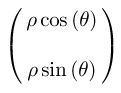
(show-expression
 ((compose
   (chart R2-rect)
   (point R2-polar))
  (up 'rho 'theta)))

4.

The procedure (point S2-Riemann) gives the point on the sphere given rectangular coordinates on the plane.

In other words, the function

 
(point S2-Riemann)

generates an abstract point-on-the-sphere (S2) from a point-on-the-plane (R2) in rect coordinates. In other words,

 
S2-Riemann

means

 
S2-rect

.

5.

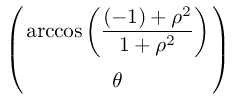
Perform an analogous computation to get the polar coordinates of the point on the plane corresponding to a point on the sphere given by its colatitude and longitude.

(show-expression
 ((compose
   (chart R2-polar)
   (point R2-rect)
   (chart S2-Riemann)
   (point S2-spherical))
  (up 'phi 'lambda)))

— Me@2023-04-22 10:42:50 PM

.

.

2023.04.25 Tuesday (c) All rights reserved by ACHK

Posted in FDG