To read a WordPress blog in chronological order, simply add ?order=asc to the end of URL.

— Me@2025-12-09 01:21:29 PM
.
.
2025.12.11 Thursday (c) All rights reserved by ACHK

To read a WordPress blog in chronological order, simply add ?order=asc to the end of URL.
— Me@2025-12-09 01:21:29 PM
.
.
2025.12.11 Thursday (c) All rights reserved by ACHK

If WordPress keeps opening the block editor instead of the Classic Editor, simply add
&classic-editor
to any edit URL such as
post.php?post=123&action=edit&classic-editor
and hit Enter to instantly open the Classic Editor.
— Me@2025-12-06 07:59:41 AM
.
.
2025.12.06 Saturday (c) All rights reserved by ACHK
<pre style="color: #333333;background-color: #ffffcc;font-size: 12pt;font-family:Calibri">
  <span style='mso-spacerun:yes'>  </span>...
</pre>
— Me@2024-11-15 01:42:34 AM
.
.
2024.11.15 Friday (c) All rights reserved by ACHK
所有第一次, 2
.
<table border="1" style="border-collapse: collapse;width: 70%;margin: 20px auto">
  <thead>
    <tr>
      <th style="border: 1px solid #ddd;padding: 12px;text-align: left;background-color: #f2f2f2;color: #333">Duration</th>
      <th style="border: 1px solid #ddd;padding: 12px;text-align: left;background-color: #f2f2f2;color: #333">Subject</th>
    </tr>
  </thead>
  <tbody>
    <tr>
      <td style="border: 1px solid #ddd;padding: 12px">3 hours</td>
      <td style="border: 1px solid #ddd;padding: 12px">理科</td>
    </tr>
    <tr>
      <td style="border: 1px solid #ddd;padding: 12px">1 hour</td>
      <td style="border: 1px solid #ddd;padding: 12px">語文</td>
    </tr>
    <tr>
      <td style="border: 1px solid #ddd;padding: 12px">1 hour</td>
      <td style="border: 1px solid #ddd;padding: 12px"></td>
    </tr>
    <tr>
      <td style="border: 1px solid #ddd;padding: 12px">3 hours</td>
      <td style="border: 1px solid #ddd;padding: 12px">文科</td>
    </tr>
  </tbody>
</table>
| Duration | Subject |
|---|---|
| 3 hours | 理科 |
| 1 hour | 語文 |
| 1 hour | |
| 3 hours | 文科 |
這個心結的本質就在於,和維珍在一起的時候,她所有的經歷,都是[只]跟你有關。那從青澀到成熟,都是只有你的參與。這種經歷,是可以支撐後面,漫漫的人生路。
維珍是把她自己,所有的一切,[都]給了你。而面對英航的時候,腦海當中,想起那段感情和經歷,不是跟自己的,就會覺得憋屈難受。
— 軒語說媒
.
.
2024.10.23 Wednesday ACHK
htmlize, 2.2.2
.
<pre style="color: #333333;background-color: #f8f8f8;font-size: 16px">
...
</pre>
<pre style="color: #333333;background-color: #f8f8f8;font-size: 16px;font-family: DejaVu Sans Mono">
...
</pre>
— Me@2024-08-27 01:24:01 PM
.
.
2024.09.01 Sunday (c) All rights reserved by ACHK

<div style="color: #333333; font-size: 20px; font-family: AR PL UKai TW">
楷書測試
</div>
楷書測試
The above Chinese characters should be displayed in the regular script font (楷書). Otherwise, you need to install this package on your Linux distribution:
fonts-arphic-ukai

— Me@2024-08-13 01:41:14 PM
.
.
2024.08.30 Friday (c) All rights reserved by ACHK
Equation within a blockquote:
.
.
To improve it, replace the 
$latex \displaystyle{E_{\rm {rel}}=\sqrt{(m_{0}c^{2})^{2}+(pc)^{2}}}&s=1&bg=EAEFF3&fg=15100c$
.
.
— Me@2023-12-27 12:33:01 PM
.
.
2024.08.20 Tuesday (c) All rights reserved by ACHK
htmlize, 2.2
.
<pre style="color: #333333;background-color: #f8f8f8;font-size: 16px">
...
</pre>
— Me@2024-08-15 01:20:39 PM
.
.
2024.08.15 Thursday (c) All rights reserved by ACHK
htmlize, 2.1
.
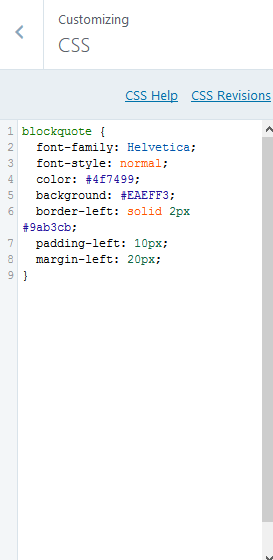
blockquote {
	font-family: Helvetica;
	font-style: normal;
	color: #4f7499;
	background: #EAEFF3;
	border-left: solid 2px #9ab3cb;
	padding-left: 10px;
	margin-left: 20px;
}

pre {
	white-space: pre-wrap;
	word-wrap; break-word;
}

#infinite-handle {
	display: none;
}

.infinite-scroll #nav-below {
	display: block;
}

.infinite-scroll #content {
	margin-bottom: 0;
}

.wp-caption .wp-caption-text:before {
	display: none;
}

.wp-caption .wp-caption-text {
	text-align: center;
	padding: 5px 7px 0;
}
— Me@2024-08-09 07:00:38 AM
.
.
2024.08.09 Friday (c) All rights reserved by ACHK
is an Emacs app for exporting syntax-highlighted buffers to html files. This post is about how to install it.
1. In the Bash terminal, get htmlize by the following command:
sudo apt-get install elpa-htmlize
2.0 Change the value of the variable htmlize-output-type to inline-css by the following steps:
2.1 In Emacs, run the function describe-variable by the hotkey:
Ctrl-h v
2.2 When you are asked to describe variable, type
htmlize-output-type
2.3 Click “customize“.
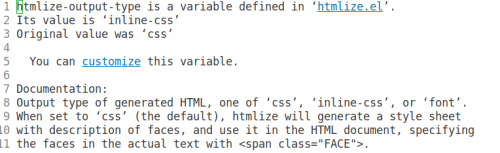
2.4 Click “Value Menu“.

2.5 Select “inline-css“.
2.6 Click “Apply and Save“.

.
3.1 Then whenever you want to turn the Emacs buffer into html, run the command
M-x htmlize-buffer
The buffer will show the generated html code.
3.2 Save the buffer as an html file. The html code itself will get syntax-highlighted.
.
4.1 In the output html file, delete everything before
<body style="color: #333333; background-color: #FFFFFF;">
4.2 Then replace these 2 lines
<body style="color: #333333; background-color: #FFFFFF;">
    <pre>
with
<pre style="color: #333333;background-color: #FFFFFF">
4.3 Delete everything after
</pre>
— Me@2023-01-15 03:39:29 PM
.
.
2023.01.22 Sunday (c) All rights reserved by ACHK
blockquote {
	font-family: Helvetica;
	font-style: normal;
	color: #4f7499;
	background: #EAEFF3;
	border-left: solid 2px #9ab3cb;
	padding-left: 10px;
	margin-left: 20px;
}

#infinite-handle {
	display: none;
}

.infinite-scroll #nav-below {
	display: block;
}

.infinite-scroll #content {
	margin-bottom: 0;
}

.wp-caption .wp-caption-text:before {
    display:none;
}

.wp-caption .wp-caption-text {
    text-align:center;
    padding:5px 7px 0;
}
— Me@2020-03-14 04:30:08 PM
.
.
2020.03.14 Saturday ACHK

— Me@2020-02-16 06:20:52 PM
.
.
2020.02.16 Sunday (c) All rights reserved by ACHK
— Me@2018-04-05 06:09:36 PM
.
.
2018.04.05 Thursday (c) All rights reserved by ACHK


 Physics Town
You must be logged in to post a comment.